
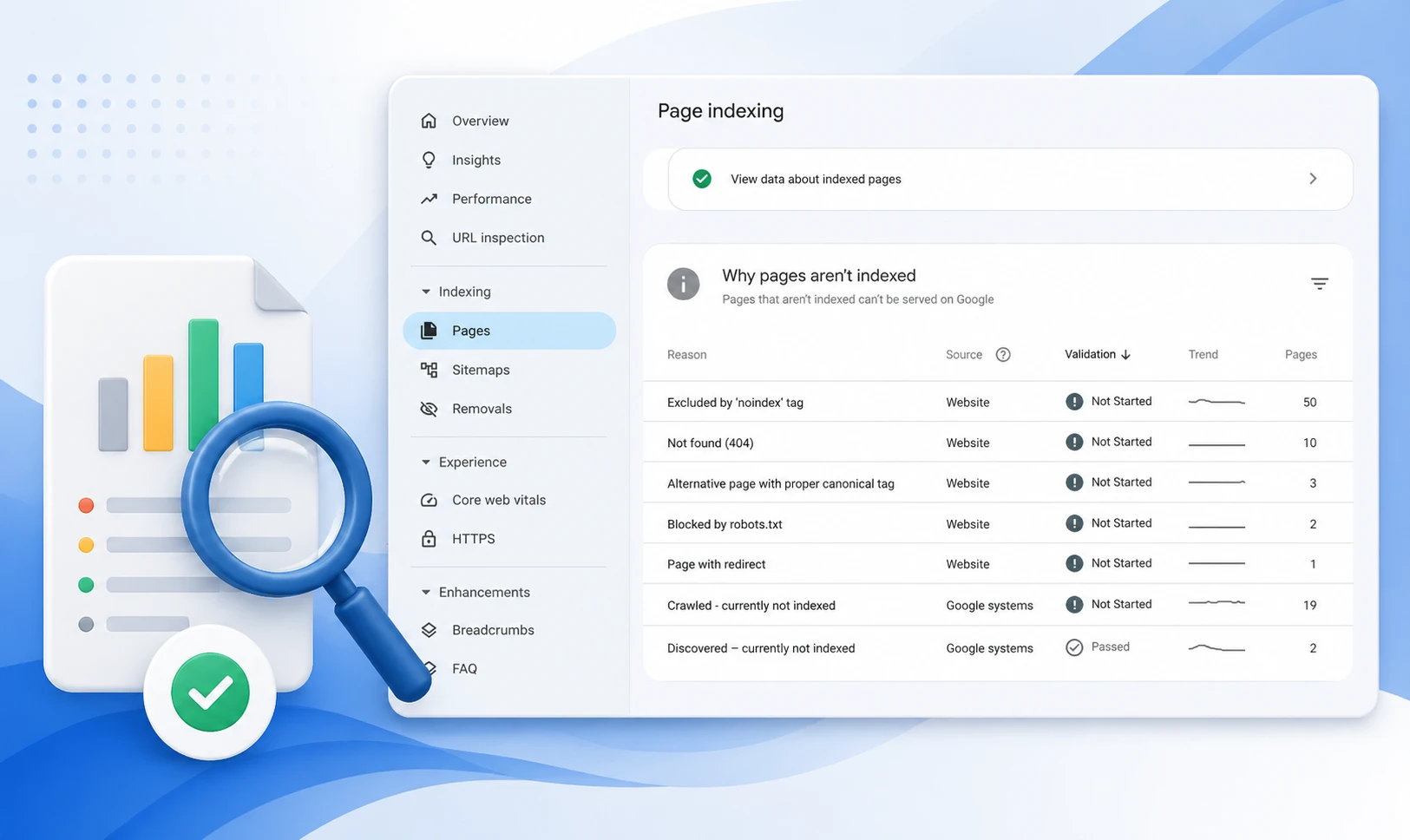
The GSC Coverage report (now called Page Indexing) shows every URL Google has discovered on your site and its index status: Valid, Valid with warnings, Excluded, or Error. Each status contains specific issue types that identify why a page is or is not in Google’s index. Use it to protect indexed pages, resolve blocking errors, and audit pages Google is choosing not to index.
Introduction
A page that isn’t indexed by Google cannot rank. It cannot drive traffic. It doesn’t exist in search — regardless of how well it’s written or how many backlinks it has.
The GSC Coverage report (also referred to as the Page Indexing report in newer GSC interfaces) is the diagnostic tool that reveals exactly which pages Google has indexed, which it has chosen to exclude, and which it cannot reach at all. It operates before the Performance report: no clicks, no impressions, no rankings are possible without index coverage first.
According to indexing data patterns across enterprise sites, traffic loss from indexing issues accounts for 18–27% of a site’s total organic traffic on average. For e-commerce sites with large product catalogs, the impact is higher. This guide breaks down every status, what it means strategically, and the exact workflow to fix each one.
Key Takeaways
- The GSC Coverage report shows four status categories — Valid, Valid with warnings, Excluded, and Error — each requiring a different strategic response.
- Crawl ≠ Index: Google visiting a page is the first step only. Pages must also pass a quality assessment before entering the index.
- Filter by ‘All submitted pages’ first — this compares only URLs in your sitemap against index status, isolating the highest-priority gaps.
- The two most common index coverage issues — ‘Crawled not indexed’ and ‘Discovered not indexed’ — require completely different fixes; applying the wrong one wastes weeks.
- After fixing any index coverage error, validate the fix in GSC and cross-confirm via URL Inspection Live Test — the Coverage report can lag by several days.
What the GSC Coverage Report Actually Tells You
The Coverage report maps the full journey from URL discovery to indexation. It does not show rankings, clicks, or traffic — those live in the Performance report. What it shows is whether the prerequisite to all of that (being in Google’s index) has been met.
The report has two critical view modes that most teams never toggle between:
- All known pages — every URL Google has discovered by any means, including links, sitemaps, and crawl paths. Includes many URLs that should not be indexed (parameter variants, internal search pages, etc.).
- All submitted pages — only URLs in your submitted sitemap. This view isolates the gap between what you intend to be indexed and what actually is. This is the strategically important view.
Index coverage data refreshes less frequently than Performance data — typically every few days. After making a fix, wait 3–5 days before assessing impact in the report. For immediate confirmation, use URL Inspection Live Test.
The Four GSC Coverage Report Statuses: What Each Means
The Error category contains the most actionable issues in the GSC Coverage report. These pages are completely absent from Google’s index.
| Error Type | Root Cause | Fix |
|---|---|---|
| Server error (5xx) | Server failed to respond during Googlebot’s visit | Fix server stability; check hosting logs for Googlebot IP range |
| Redirect error | Redirect chain too long, circular, or returning wrong code | Resolve to a single direct 301; remove chains over 3 hops |
| Blocked by robots.txt | robots.txt Disallow rule stopping Googlebot | Remove the Disallow rule; use noindex instead if needed |
| Not found (404) | Page returns 404 — expected if deleted, problem if live | Restore the page or 301 redirect to a relevant alternative |
| Crawl anomaly | Googlebot encountered an unexpected error (4xx or 5xx) | Use URL Inspection to identify the exact error; check server logs |
After fixing any Error, use GSC’s Validate Fix button on the issue detail page. Validation can take up to two weeks. If validation fails, at least one instance of the issue remains — click ‘See details’ to identify remaining affected URLs.
Understanding Index Coverage Exclusions: Which Are Fine, Which Are Not
The Excluded category is where strategic judgment matters most in the GSC Coverage report. Not every exclusion is a problem. Some are the intended outcome of deliberate architecture decisions.
| Exclusion Status | Intentional? | Action Required |
|---|---|---|
| Excluded by noindex tag | Yes — if placed intentionally | Verify the tag was placed on purpose; check CMS settings after updates |
| Alternate page with proper canonical | Yes — signals the preferred version is indexed | Confirm the canonical destination is actually indexed |
| Duplicate, Google chose different canonical | Usually No — Google overrode your canonical signal | Investigate signal conflicts: internal links, URL structure, content similarity |
| Crawled — currently not indexed | No — Google visited but rejected on quality grounds | Improve content depth, E-E-A-T signals, or consolidate thin pages. Know why pages are not indexed by Google |
| Discovered — currently not indexed | No — Google hasn’t crawled it yet due to low priority | Add internal links from indexed pages; ensure crawl budget isn’t wasted on low-value URLs |
| Blocked by robots.txt | Yes — if the block is deliberate | Verify intentional; check for AI crawler blocks accidentally catching Googlebot |
The Critical Distinction: Crawled vs. Discovered Not IndexedThese two statuses look similar but require completely different fixes.
- Crawled — not indexed: Google visited the page and made a quality decision to exclude it. Fix: improve content depth, consolidate thin pages, strengthen E-E-A-T signals. Internal linking alone will not resolve this.
- Discovered — not indexed: Google found the URL but hasn’t visited it. Fix: add internal links from already-indexed pages to pass crawl priority. Content quality is irrelevant until Google actually crawls the page.
The Strategic Workflow for Auditing the GSC Coverage Report
A reactive approach to index coverage — fixing errors as they appear — misses the bigger picture. A strategic audit runs on a repeatable schedule and use the Performance report to identify striking distance pages once indexed.
- Step 1: Switch view to ‘All submitted pages.’ This filters to URLs in your sitemap only — the pages you’ve explicitly declared as indexation targets.
- Step 2: Check Error count first. Any errors here are high-priority — these are pages you submitted that Google cannot process. Fix before any other investigation.
- Step 3: Check Valid count against your expected indexed page count. If the gap is more than 10–15%, something structural is preventing indexation at scale.
- Step 4: Open Excluded and sort by volume. Focus on ‘Crawled not indexed’ (quality signal issue) and ‘Discovered not indexed’ (crawl priority issue). Each needs a different workflow.
- Step 5: After each fix, click Validate Fix in the issue detail page. Monitor for 14 days. If validation fails, the issue persists on at least one URL.
Check the detailed GSC opportunities guide .
Weekly: Check Error count for new issues. Monthly: Run the full audit workflow above. After any significant site change (migration, URL restructure, template update, plugin update): Monitor daily for the first 7 days — structural changes are the most common cause of sudden indexation drops.
Index Coverage and AI Search: Why It Matters More in 2026
In 2026, the GSC Coverage report has a consequence beyond traditional search: pages not in Google’s index are also largely invisible to AI systems. Google’s AI Overviews, and LLMs that rely on Google’s index as a content source, cannot surface content that hasn’t been indexed.
Missing sitemaps, noindex tags applied by CMS plugins, or soft 404s can block content from appearing in both traditional and generative search results — even if the content is well-written and structurally optimized.
- Index coverage is the prerequisite for AI Overview citations — Google cannot cite what it hasn’t indexed.
- Structured data errors flagged in the Enhancements section compound coverage issues — schema that isn’t parsed correctly reduces the likelihood of rich result eligibility.
- Pages in the Excluded category with a ‘Crawled not indexed’ status will not appear in AI Overviews regardless of content quality, because Google has already assessed and deprioritized them.
Learn to combine indexation data with post-click behavior in GA4 with GSC vs GA4 guide.
- Click the date filter → Compare → select two equal-length periods
- In the chart, lines that diverge after a specific date confirm that a change had an impact
- In the table, the Clicks Difference and Position Difference columns show per-page and per-query change
- Sort by Clicks Difference descending to find winners; ascending to find losers
After changing a title tag, wait 28 days. In the Performance report, filter by that page URL. Use Compare: the 28 days post-change vs the 28 days before. Check CTR at the same average position. A CTR improvement at an unchanged position is the metadata’s contribution — isolated from any ranking change. This is the correct measurement method, not comparing total traffic.
Conclusion
The GSC Coverage report is the diagnostic layer that makes everything else in SEO possible. Without index coverage, there are no rankings, no clicks, and no AI Overview citations. It is the first report to check, the first to fix, and the one most commonly reviewed too infrequently.
The strategic approach: filter to ‘All submitted pages,’ triage by Error first, then audit Excluded statuses with the correct fix for each type. Crawled not indexed requires content improvement. Discovered not indexed requires crawl priority signals. Confusing the two is the most common and most expensive mistake in technical SEO.
Review it weekly for errors. Monthly for the full audit. After every significant site change, monitor daily. The Coverage report is not a set-and-forget diagnostic — it’s the foundation of a healthy, fully indexed site in a search landscape that increasingly rewards pages Google has decided are worth including.
Frequently Asked Questions
What is the GSC Coverage report?
The GSC Coverage report (also called the Page Indexing report) shows the indexation status of every URL Google has discovered on your site. It categorizes pages into four statuses — Valid, Valid with warnings, Excluded, and Error — each identifying a different reason a page is or is not in Google’s index. It is the primary diagnostic tool for technical SEO issues that prevent pages from appearing in search results.
What is the difference between 'Crawled not indexed' and 'Discovered not indexed'?
‘Crawled not indexed’ means Google visited the page, evaluated the content, and made a deliberate quality decision to exclude it. The fix requires improving content depth, E-E-A-T signals, or consolidating thin pages. ‘Discovered not indexed’ means Google found the URL but hasn’t visited it due to crawl priority. The fix requires stronger internal links from indexed pages — not content improvement. Applying the wrong fix to either status produces no result.
How often does the GSC Coverage report update?
The Coverage report updates less frequently than the Performance report — typically every few days rather than daily. After fixing an indexation issue, wait 3–5 days before assessing impact in the Coverage report. For immediate confirmation that a fix is working, use URL Inspection Live Test, which reflects the current live state of the page. When the two conflict, URL Inspection is authoritative.
Should all Excluded pages be investigated?
No. Some exclusions are intentional and correct: noindex tags on admin pages, canonical redirects pointing to a preferred version, or paginated URLs deliberately excluded to consolidate crawl budget. Focus investigation on Excluded statuses applied to pages you intend to rank — particularly ‘Crawled not indexed’ and ‘Discovered not indexed’ on URLs that appear in your submitted sitemap.
What happens if I fix an error in the Coverage report?
After fixing the root cause, click the Validate Fix button on the issue’s detail page in GSC. Google will re-crawl a sample of affected URLs to confirm the fix. Validation typically takes up to two weeks. If it fails, at least one instance of the issue remains. Click ‘See details’ to identify remaining affected URLs. Always cross-confirm using URL Inspection Live Test before marking an issue as resolved.